

Create an event
An event is created with a five-step wizard. The bar at the top tells you which step you’re on; Avanti (next) and Indietro (back) move between the steps without losing what you’ve written.
1. Scheda Evento — event page
Section titled “1. Scheda Evento — event page”Everything people see when they open the event:
- Public title and full description: programme, prizes, special rules.
- Event visibility: Pubblico (public) appears in everyone’s lists, Privato (private) is open only to authorised profiles.
- Entrant visibility: if you turn it off, the event page doesn’t show the list of entrants.
- Cover image: the recommended format is 1920 × 1080 px.
- Sponsors, split into Platinum, Gold and other sponsors.
- Venue and dates of the event, start and end.
- Registration window: opening, closing and the edit deadline, after which entry details can no longer change. Registrations open and close by themselves on these dates.
- Event programme: the programme items to show, with time, activity and area (for example athlete check-in, Mat A).
- Rulebooks: turn on those for the competition, even more than one.
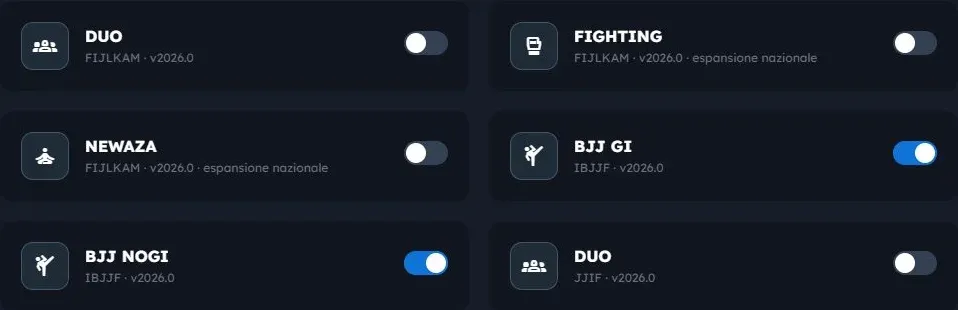
The loaded rulebooks are IBJJF BJJ GI and NO-GI, JJIF Fighting, Ne-Waza and Duo System, and the FIJLKAM national rules (the Italian federation) for the same three disciplines. When you turn one on, the event gets all its categories: by age, gender, weight and, in BJJ, belt.
2. Specialità & Categorie — disciplines and categories
Section titled “2. Specialità & Categorie — disciplines and categories”One section for each active rulebook. Here you set the fees and adapt the categories: the details are on the Categories and rulebook page.
3. Parametri Tecnici — technical settings
Section titled “3. Parametri Tecnici — technical settings”- Mat configuration: how many mats there are and, for each, which disciplines it accepts. By default every mat accepts them all; untick one to reserve a mat, for example, to Ne-Waza only.
- Break between matches: the guaranteed rest minutes between two matches of the same athlete.
- Break before final/bronze: the rest minutes before a final or a bronze match.
- Ranking & scoring criteria: the points for each medal and result.
The mat schedule respects these breaks for every athlete, even when they compete in two disciplines on different mats.
4. Prezzi & Pacchetti — prices and bundles
Section titled “4. Prezzi & Pacchetti — prices and bundles”Bundles are offers for people entering several disciplines: name, description, included disciplines, standard price and early-bird price with its deadline. This step is optional.
5. Riepilogo — summary
Section titled “5. Riepilogo — summary”The final check: dates, venue, registration close, mats, athlete rest, bundles and programme. If something essential is missing, for example no active rulebook, the summary says so.
When everything is in order press Pubblica Evento (publish event): the event becomes visible and, on the opening date, starts taking registrations.
Editing an event
Section titled “Editing an event”From the event page open the edit view: it is the same wizard, with Salva (save) instead of Pubblica Evento. Some choices, such as the tie-break and third places, lock once the event has started: from then on the brackets already exist.